Briefi Meetings

Every client meeting, prepared for and followed up.

For anyone whose work runs through client meetings. Briefi writes the brief before you join, captures the conversation, and has the recap, the actions and the follow-up email drafted by the time you are back at your desk.

From A$29 a monthone person, every meeting
14-day free trialon every plan
Hosted in Sydneyencrypted with your workspace's key
Who it is for

If your work happens in meetings, the write-up should not be yours to do.

Meetings is the edition for anyone who meets clients, candidates or customers and owes them something afterwards. No trade set-up, no registers. Your calendar, your inbox and the meeting.

Consultants and agencies

Discovery calls, workshops and status meetings, each written up and sent the same day.

Recruiters and sales teams

Every candidate or prospect call captured, with the next step pushed to your CRM.

Founders and directors

Investor, partner and customer meetings across more than one business, each in its own workspace.

Advisers, brokers and accountants

Start with your meetings. Advisor adds the client record, registers and signing when you want them.

How the editions fit
How it works

Before, during and after. Then round again.

Each meeting feeds the next one. What a client asked for, and what you promised them, is waiting in the brief the next time you meet.

1 · BeforeA brief, ready before you join

Who is coming, what was said last time, what is still open, and the questions worth asking.

2 · DuringThe conversation, captured

A notetaker joins the call, or you record in the browser. Or bring the notetaker you already use.

3 · AfterRecap, actions and the follow-up

Decisions and actions with the minute they were said, and an email drafted in your voice.

Anything still open goes into the next brief.

BeforeWed 30 Sept · 10:30

Walk in knowing what was promised last time.

Briefi reads the meeting on your calendar and your past meetings with the people coming, and writes a brief you can read in two minutes.

  • Add what only you know. Type a line or dictate one before it writes, and the brief takes it as the starting point.
  • Public background on the person and their company, when you switch research on.
  • A morning brief of the day's meetings you can read or listen to.
  • Questions sent ahead. On Business, a short form goes to attendees before the meeting, so you walk in with their answers.

Illustration with sample data. The brief's sections follow your meeting type.

DuringWed 30 Sept · 11:00

Capture the meeting the way it happens.

On a video call, in the browser, through a notetaker you already pay for, or across a table. Every route ends in the same transcript and the same recap.

A notetaker joins the call

Send it to one meeting, or let it join every meeting on your calendar that has a video link. It sits in the call as a visible participant.

Pro and Business
Record in the browser

One click on the meeting page, with live captions as you go on Pro and Business. Good for calls where a notetaker would be out of place.

Every plan
Bring your own notetaker

Already use Fireflies, Fathom, Read.ai or Grain? Connect it, and Briefi writes the recap and follow-up from its transcript.

Pro and Business
In the room

A recorder for face-to-face meetings that asks for the client's consent out loud and keeps that clip with the recording.

On request

Recordings are capped by length on each plan: two hours on Pro, four hours on Business. Every plan includes recording hours each month, and you can buy more if a month runs long.

AfterWed 30 Sept · 11:32

The recap is written before you are back at your desk.

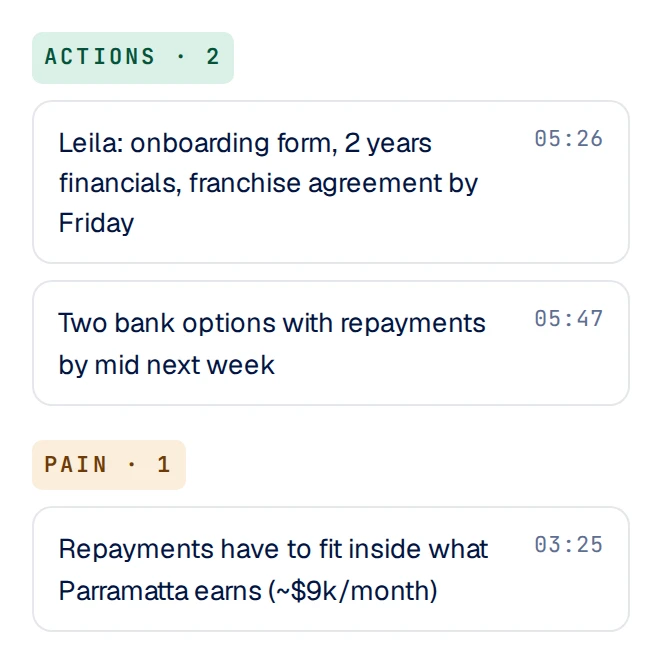
  • Decisions, actions and pain points, each stamped with the minute in the call it was said.
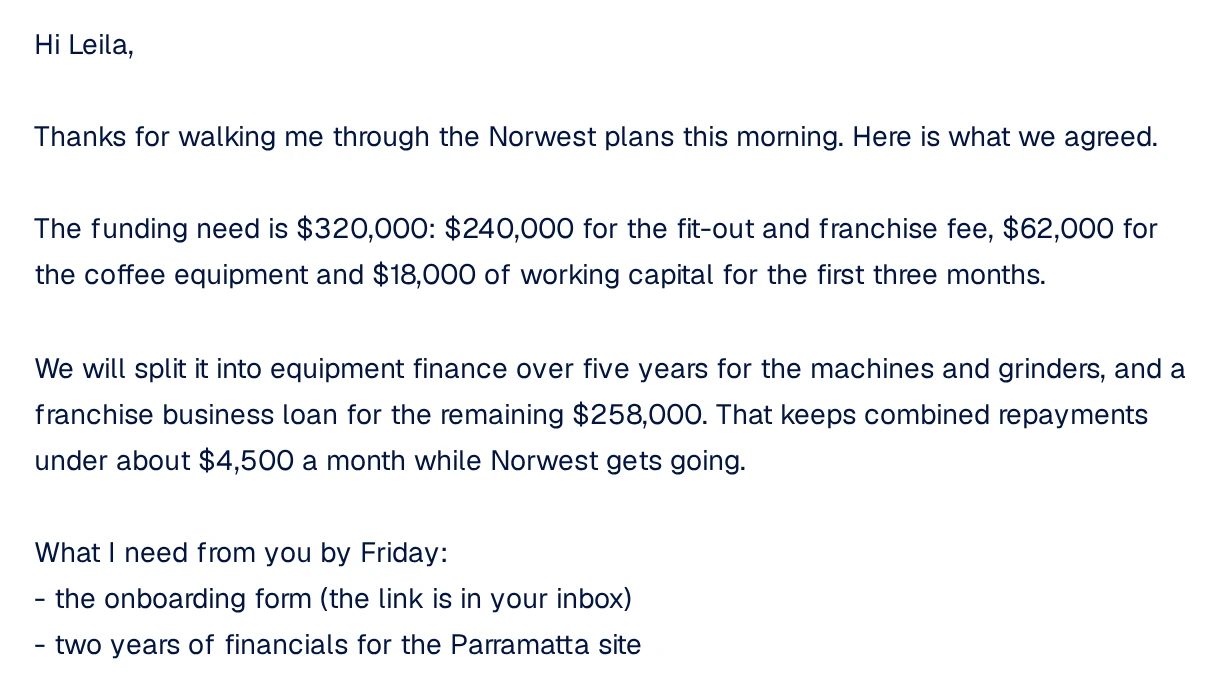
  • The follow-up, drafted in your voice. Make it warmer, shorter or more direct, then send it from your own mailbox.
  • Nothing slips. Overdue actions come back to you as reminders and in a daily digest, on Pro and Business.
Captured highlights from the Haddad Coffee Co meeting: two actions and one pain point, each stamped with the minute in the call it was said.

Highlights, with the minute each was said.

The drafted follow-up to Leila: the funding need of $320,000 split into equipment finance and a franchise business loan, repayments kept under about $4,500 a month, and what is needed from her by Friday.
WarmerShorterMore directRegenerate
WarmerShorterMore direct

Real screens from a demo workspace. Names are fictional.

A whole meeting

One client meeting, start to finish.

Two minutes of an annual review with sample clients: the conversation with live captions, the recap with every action and its owner, the follow-up, and the renewal signed on a phone.

Inbox and calendar

The meetings come from your calendar. The follow-up goes from your inbox.

Connect Google or Microsoft 365. Briefi tells your client meetings from your internal ones, and keeps the email around each client in view.

  • Urgent mail raised, with replies drafted for you to read and send.
  • Booking pages clients can pick a time from, with no limit on Pro or Business.
  • Several workspaces, each with its own calendar, inbox and clients, if you work across more than one business.
Your CRM

The meeting lands in your CRM without you retyping it.

When you send the follow-up, Briefi can push the meeting to your CRM: the contact updated, with the meeting notes and the next step attached.

  • Ten CRMs: GoHighLevel, HubSpot, Monday, Pipedrive, Close, Copper, ActiveCampaign, Salesforce, Zoho CRM and Microsoft Dynamics 365.
  • One per workspace, so each business pushes to its own.
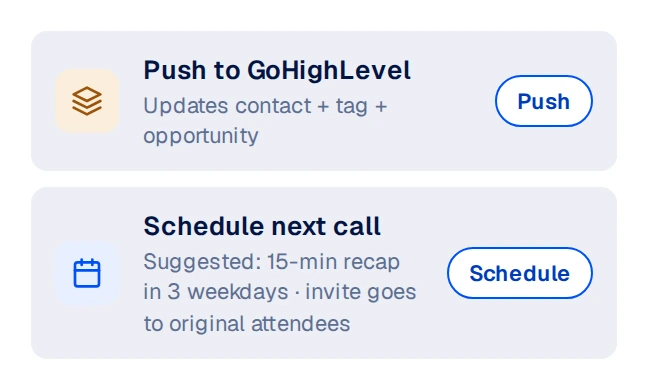
  • The next call, suggested. Book it with the same attendees in one step.
Pro and Business
  • GoHighLevel
  • HubSpot
  • Monday
  • Pipedrive
  • Close
  • Copper
  • ActiveCampaign
  • Salesforce
  • Zoho CRM
  • Microsoft Dynamics 365
Next steps on a follow-up: Push to GoHighLevel, which updates the contact, a tag and the opportunity; and Schedule next call, suggesting a 15-minute recap in 3 weekdays with the original attendees.

Real screen from a demo workspace.

The practice view · Monday 26 Oct

What slipped last week, by name.

The Shahs are one household among the many Sam looks after. Each Monday at 7 am, your time, the weekly review reads the week’s meetings, emails and deals across the whole practice and lists what is still open: the meeting with no follow-up, the thread that needs a chase, the deal that stopped moving and the contact gone cold, with a line on where to focus.

  1. The one thing to do first

    A sentence written from what actually happened that week, naming the client and why it matters now.

  2. Who has stopped replying

    Threads where the client owes you an answer, with how long they have been quiet.

  3. Work that stopped moving

    Deals with no change in weeks, before they quietly drop off the list.

Drawn with sample data from the weekly review’s real sections. Names are fictional.

Meetings pricing

Start with the notetaker. Add a team when you need one.

Billed once a year, shown as a monthly rate.Billed once a year, shown as a monthly rate.

Pro

A$29A$24/mo

The notetaker joins your calls and your CRM stays current.

  • 1 user
  • 4 recording hours and 1,000 credits a month
  • Briefs, recaps, actions and drafted follow-ups
  • Notetaker, live captions, your own notetaker connected
  • CRM push, reminders and a daily digest
  • Up to 5 other mailboxes beside Google, a CalDAV calendar, 180 days of history
Start free trial

Business

A$45A$36/mo

A team that shares clients.

  • 1 users
  • 7 recording hours and 1,000 credits a month, plus 4 hours and 1,000 credits for each extra user
  • Questions sent to attendees before the meeting
  • Your own email formats, API access, 360 days of history

Each extra user A$29A$24 a month, up to 15 users

Start free trial
What a credit is

Credits pay for the writing: a brief, a recap, a drafted reply. Recording time is counted separately, in hours. Top up 200 credits for A$12, or 5 hours for A$19.

A larger firm

Scale covers every edition across up to 15 workspaces, from A$349A$279 a month. Enterprise is priced on contract.

14-day free trial. AUD prices include GST for Australian customers. Your currency is detected at checkout.Compare Meetings plans
Meetings, Sign and Advisor

Start with your meetings. Move up when the work does.

  1. 1Meetings

    For anyone with client meetings. Most people start here.

  2. 2Sign, when paperwork is the job

    Forms sent from your own mailbox and returned signed, for practices that need no meeting tools. A workspace runs one edition.

  3. 3Advisor, when you need both

    Meetings and Sign together, plus the client record, for advisers, brokers and accountants. Your meetings, contacts and history stay in the same workspace when you move up.

Questions

What people ask first.

Do I need to be an adviser to use Meetings?

No. Meetings works for anyone with client, candidate or customer meetings. Advisor is the separate edition for regulated practices that also need the client record.

Which calendars and mailboxes work?

Google and Microsoft 365 calendars and mailboxes. Pro and Business also connect other mailboxes over IMAP and other calendars over CalDAV, which Briefi reads but never writes to.

Do people know the meeting is being recorded?

The notetaker joins as a participant everyone in the call can see. The in-room recorder asks for consent out loud before it starts. Telling people, and getting their consent where the law requires it, stays with you.

I already use Fireflies. Can I keep it?

Yes, on Pro and Business. Connect Fireflies, Fathom, Read.ai or Grain in your workspace settings, add Briefi's address in that tool, and Briefi writes the recap and follow-up from its transcripts.

How long are recordings kept?

You set it for your workspace. The transcript and recap stay with the meeting after the audio is deleted.

What happens if I run out of credits or hours?

You can top up at any time: 200 credits for A$12, or 5 recording hours for A$19. Your allowance resets each month.

Can I move to Advisor later?

Yes. Advisor includes everything in Meetings and Sign, so moving up keeps your meetings, contacts and history in the same workspace.

Bring tomorrow's meeting. We will show you its brief.

Start a 14-day trial with your own calendar, or book a 30-minute demo.