Briefi for accounting practices

Every entity your clients run, and every lodgement it owes.

For accounting and bookkeeping practices. Briefi prepares and writes up your client meetings, keeps a register of every company, trust and super fund a family group controls, collects the year’s records and gets the engagement letter and the approvals signed.

From A$69 a monthAdvisor Start, one seat
14-day free trialon every plan
Never a tax file numberthe register leaves it out
An accountant reviewing a printed document with a colleague in a bright office.
How a client file moves

From the meeting to the signed copy, on one record.

  1. BriefBefore you meet: what the client still owes you, and what falls due.
  2. MeetingCaptured and transcribed, or written up from the notes you dictate.
  3. RecapDecisions and actions with an owner, and a follow-up drafted for you to check.
  4. FormThe next step goes out: a records request, a checklist or an approval.
  5. Signed and filedEach person signs. The signed copy is filed to the family group.
The meetings you run

Four kinds of client meeting, and what comes after each.

Every meeting gets a brief before and a recap after: decisions, actions with an owner, and a follow-up drafted for you to check and send, filed to the client group. What differs is the next step.

Sample data, drawn. Names are fictional.

MeetingBeforeAfter
Onboarding meetingNew client journey
BeforeThe engagement letter is signed and the client information form is back before you meet.
AfterNext on the journey: record their entities and the lodgements each one owes, due within 7 days.
Going through the return21 days before the due date
BeforeThe brief shows what is still missing from the client and the lodgement date on the record.
AfterThe client’s approval for lodgement goes out to sign, due 14 days before the date.
Annual planningYearly, from 60 days before
BeforeAn optional pre-planning check-in goes to the client 21 days ahead.
AfterSend the plan and the agreed actions, due within 7 days of the meeting.
Quarterly reviewEvery 3 months
BeforeThe last recap and every open action, on both sides.
AfterThe next review is counted from the cadence, with a window from 21 days before to 45 after.


Plenty of a practice’s meetings are about software, staff or suppliers. The brief leads with deadlines only when the meeting is about a client’s compliance.

The entity register

One family group. Every company, trust and fund inside it.

The family group is who you advise and bill. Each entity inside it is where the compliance work is done, so the record keeps both.

  • Six kinds of entity. Companies, trusts, SMSFs, partnerships, sole traders and individuals, with the ABN and ACN checked against their check digits, the GST cycle, and a year end other than 30 June.
  • The lodgements each one owes. Tax returns, activity statements, the ASIC annual review, and the SMSF audit and return, each with an ordinary due date your team can change.
  • A missed lodgement stays missed. One nobody ticked is still open next year, never replaced by the new period.
  • Brought in from your practice software. Map an export’s columns, preview the result, and import up to 2,000 entities a file. A re-import updates rows instead of doubling them.
What Briefi cannot see

The ATO and ASIC. Briefi never marks a lodgement as lodged on its own: your team ticks it, or your practice software sends it through the API. A due date a person set is never overwritten.

JourneyTax return · Chen Family Trust 2025-26

The work in front of a due date, laid out from the date back.

  • Every step dated from the lodgement date, so a return due on 15 May starts with the records request in late January.
  • Each step says whose move it is: yours, the client’s, a form, a meeting or a signature.
  • Journeys for the compliance year: the tax return, the activity statement, the ASIC annual review and the SMSF annual return with its independent audit, plus a new client and annual planning.
The practice’s year

One family group’s year, read off the register.

Every due date the register holds for the Chen family group from July to June, beside the reviews you hold with them.

Sample data, drawn. The register keeps the latest period of each lodgement and adds the next one when that period ends.

Forms, records and signing

The engagement letter first. Then the records, then the approvals.

Forms open in a phone browser with no app to install, and each person signs for themselves.

  1. The engagement letter

    You set the work, the entities and the fee.

    A sent engagement letter for advisory and fractional CFO work: sent 30 September 2026, not opened yet, link lasts until 30 October 2026.

    Real screen from a demo workspace. Names are fictional. The letter behind it is drawn.

  2. The year’s records

    Your team accepts or waives every file asked for.

    Sample data, drawn.

  3. The approvals

    Each director or trustee signs for themselves.

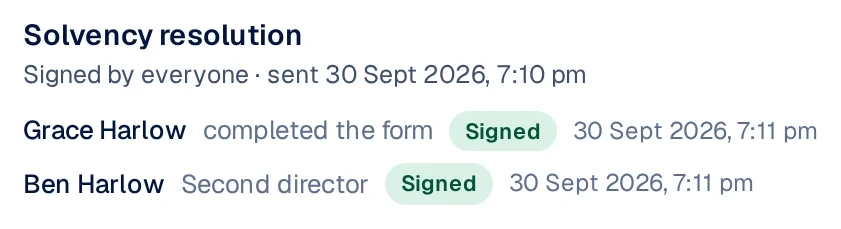
    Signatures panel: a solvency resolution signed by both directors of a client company, with the time of each signature.

    Real screen from a demo workspace. Names are fictional.

    The same panel, redrawn for small screens. Names are fictional.

  4. A portal for the family

    Clients see what they owe you, and upload it.

    Sample data, drawn. Turn on entities to show what each one owes, and when.

Who is holding up the year

See which clients answer, and how fast.

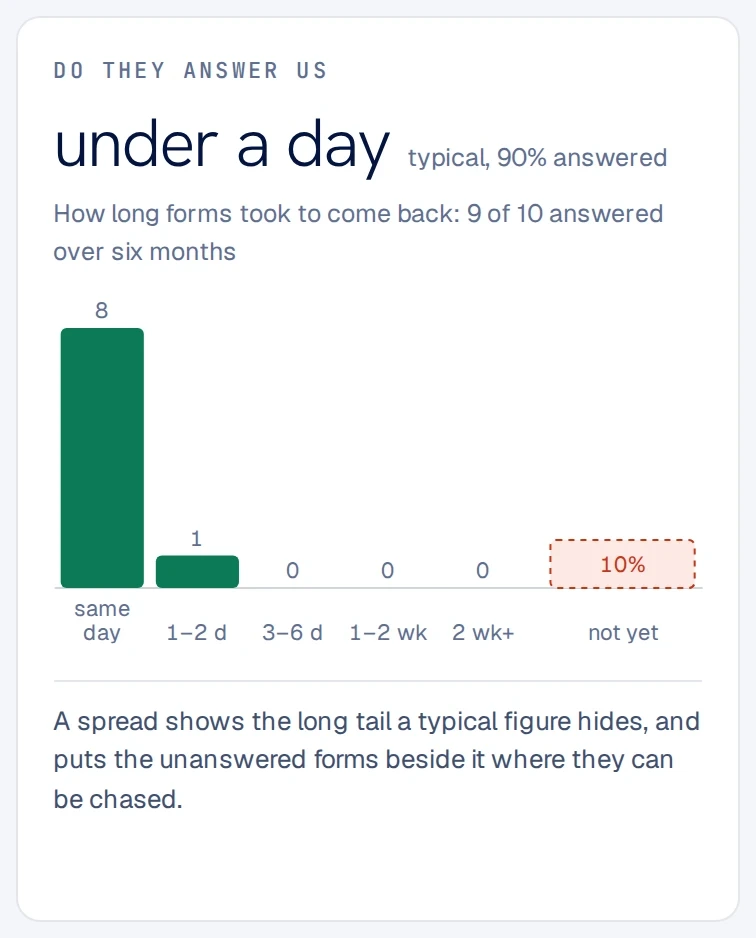
Insight counts how quickly clients return what you send them, from forms actually sent and returned. Every figure has rows behind it.

  • What is waiting on the client, and what you owe them, counted on every record.
  • Support staff on free seats on Advisor Solo and Advisor Practice, so a bookkeeper can chase records without a paid seat.
Insight card, Do they answer us: forms typically come back in under a day, 90 percent answered, 9 of 10 over six months.

Real screen from a demo workspace.

Handling client records

What the record holds, and what it leaves out.

What we can state plainly, because it is true of every workspace today.

  • Never a tax file number. The register and the entity details form leave it out. They hold what you need to schedule and discuss the work.
  • Your workspace’s own key. Briefs, recaps, transcripts and notes on each entity are encrypted with it.
  • Uploads kept only as long as stated. The removal date is on the upload page, and files are deleted on it.
  • Dates are proposals. Your lodgement program sets the real date. An import or next year’s schedule never moves one a person set.

Briefi keeps the record of who owes what, and by when. The lodgement program, and your obligations as a tax agent, stay with your practice.

Read the security overview
Pricing

The entity register comes with every Advisor plan.

Billed each month. Switch to annual for a lower rate.Billed each month. Switch to annual for a lower rate.

Advisor Start

A$69A$49/mo

A sole practitioner with a small book.

  • 1 seat
  • 50 clients on file, 10 active a monthLaunch allowance25 on file, 5 active a month after the launch offer
  • 5 recording hours and 1,500 credits a month
  • Entity register, journeys, signing and the client portal
Start free trial

Advisor Solo

A$89A$69/mo

A sole practitioner with a bookkeeper or assistant.

  • 1 seat and a free support seat
  • 500 clients on file, 50 active a monthLaunch allowance250 on file, 25 active a month after the launch offer
  • 10 recording hours and 4,000 credits a month
  • Client portal on your own briefi.sh address
Start free trial

Advisor Practice

A$249A$199/mo

An accounting practice with a team.

  • 4 seats and 4 free support seats
  • 2,000 clients on file, 200 active a monthLaunch allowance1,000 on file, 100 active a month after the launch offer
  • 40 recording hours and 12,000 credits a month
  • Client portal on your firm’s own domain
Start free trial

Kept for as long as you stay subscribed. For the first 100 workspaces or until 31 December 2026, whichever comes first.

On file, and active

On file is everyone in your record, with a family group counted once. Active is who you did work for that month, averaged over three months.

Which plans include it

The entity register and journeys are on every Advisor plan, and on Scale and Enterprise. Meetings plans and Briefi Sign do not include them.

14-day free trial. AUD prices include GST for Australian customers. Your currency is detected at checkout.Compare Advisor plans
Questions

What accounting practices ask first.

Does Briefi lodge returns with the ATO?

No. Briefi cannot see the ATO or ASIC, and it never marks anything lodged on its own. Your team ticks a lodgement, or your practice software sends the status through the API.

Do you store tax file numbers?

No. Neither the entity register nor the entity details form asks for one.

Which forms come ready to send?

Four, written for a practice, and yours to copy and change. The engagement letter: you fill in the work, the entities covered, the fee and the start date, and a second signatory signs where one is needed. Entity details: type, legal name, ABN, trustee, GST, year end and software, never a tax file number. The year-end checklist: one per entity, so each year’s answers stay with the right return. The solvency resolution and annual statement check: directors confirm the company’s details and sign for the ASIC annual review. Each person signs for themselves, and the signed copies are filed once the last signature is in.

How do record requests work?

Ask the client, or their previous accountant by upload link, for exactly the files you need. Zipped folders are unpacked, and each file is accepted or waived by a person on your team, never by Briefi.

Our lodgement program dates differ from yours.

Change them. Briefi proposes the ordinary date, such as 15 May for a return with a 30 June year end or the 28th of the month after a quarter for an activity statement, and never overwrites a date a person set.

Can we bring our client list across?

Yes. Export it from your practice software, match the columns in the browser and preview the import before it runs, up to 2,000 entities a file. Running it again updates the same rows. Entities and lodgement status can also be sent through the API.

Does it handle self managed super funds?

Yes. An SMSF owes an audit and an annual return, and its journey runs from the records request through the independent audit to the trustees signing the accounts and the return.

Can bookkeepers and admin staff use it?

Yes. Advisor Solo includes one free support seat, and Advisor Practice includes one for each paid seat, four to start.

Does it work outside Australia?

Meetings, recaps, forms, signing and the client portal work anywhere. The entity register and the accounting forms use Australian terms (ABN, ACN, activity statements, the ASIC annual review), so today they are built for Australian practices. Versions for New Zealand and the UK are planned.

Bring a client group with a trust and a super fund. We will show you its year.

A 30-minute demo, set up as an accounting practice, around a client group like one of yours.